Worked examples
These source-checkout examples turn the general controls into reproducible
atomistic workflows. They use the fixtures under
examples/readme_scene_assets/; each command opens real scientific data rather
than a prerecorded mock interface.
Note
The fixtures demonstrate editing, visualization, and geometric analysis. The built-in repulsion examples remove short contacts; they are not predictive energy calculations.
Rotate a ligand around an active atom
Open the idealized ferrocene trajectory in Edit:
v_ase gui examples/readme_scene_assets/ferrocene.traj --interactive
To keep Fe fixed while rotating a cyclopentadienyl ring:
Select the five ring atoms and any other atoms that should move.
Shift-select Fe last, making it the active atom.
Choose Structure > Transform > Active atom (last selected).
Press
R, optionally lockX,Y, orZ, type an exact angle, and pressEnter.Inspect the Fe coordinate after commit; it must be unchanged.
The active atom is a pivot, not an automatically fixed ASE constraint. Add an explicit constraint when it must also remain fixed during later relaxation.
Build a cumulative phosphorene twist
Open the 5 × 6 armchair black-phosphorene sheet:
v_ase gui examples/readme_scene_assets/phosphorene_nanosheet.cif --interactive
The model has 10 puckered ridges with 12 atoms per ridge. Green and purple can be used as visual labels for the upper and lower P sublayers; both remain ASE element phosphorus.
The 13.85° nanoribbon is created as a sequence of committed edits:
Box-select from the second ridge through the end.
Choose the global X axis, run Rotate Selection, and enter the exact per-step angle used by the trajectory fixture.
Advance the box boundary so the third ridge through the end is selected.
Apply the same exact rotation to the already edited coordinates.
Continue one ridge at a time for nine rotations.
Because every rotation starts from the previous commit, the final ridge is rotated by exactly 13.85 degrees. Orbit from above to below and confirm that both puckered sublayers form one continuous twist. Compare the result with:
v_ase gui examples/readme_scene_assets/phosphorene_twist_13p85deg.traj
v_ase gui examples/readme_scene_assets/phosphorene_twisted_nanoribbon_13p85deg.cif
The relaxed starting coordinates and target-angle references are documented by Villegas et al. and Jang et al.. The edit demonstrates exact geometry construction, not a final energy-minimized structure.
Insert oxygen into a Cu(111) slab
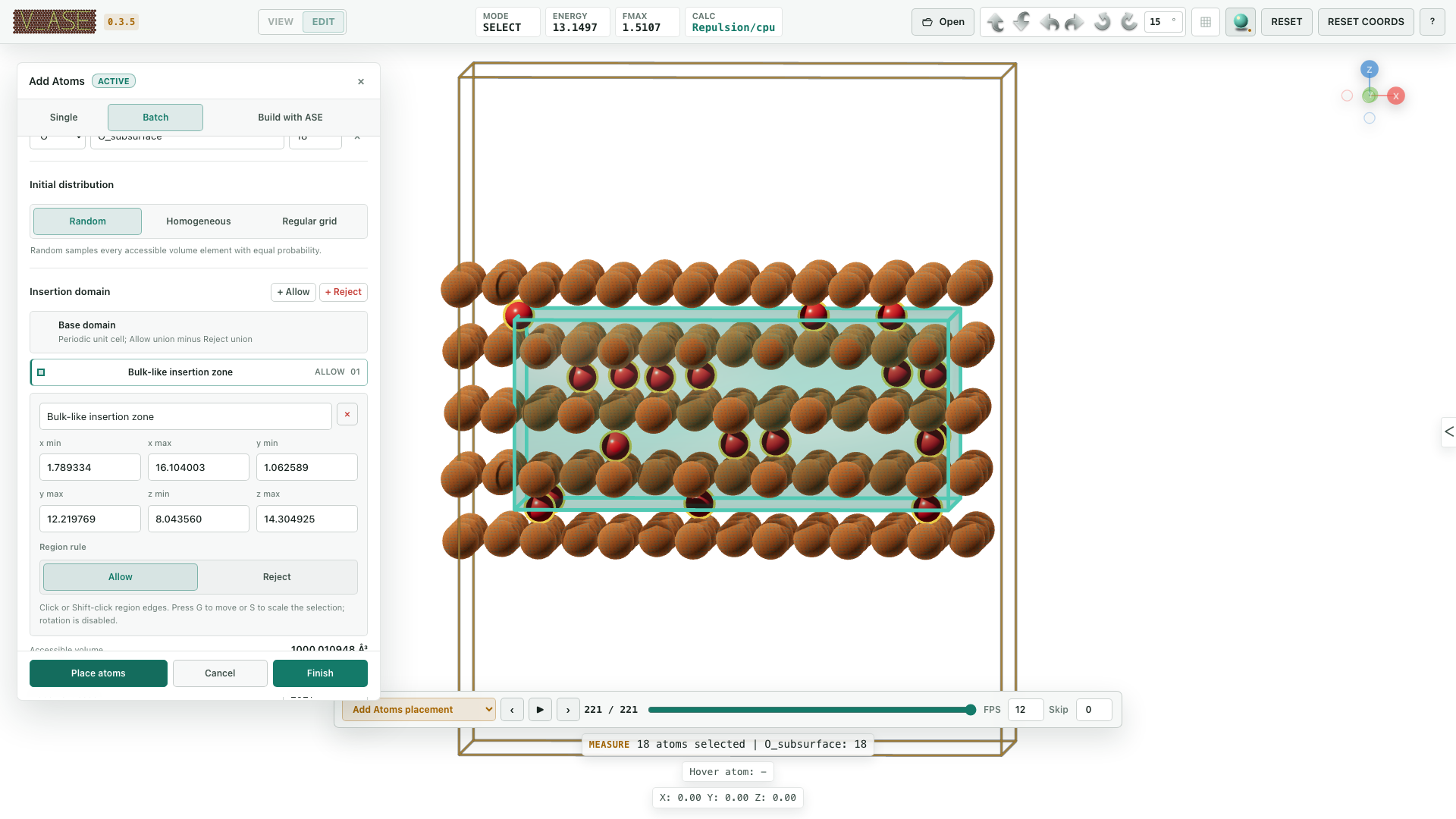
v_ase gui examples/readme_scene_assets/cu111_oxygen_add_atoms.traj --interactive
The fixture is a five-layer Cu(111) slab. A reproducible staging workflow is:
Open + Add atoms > Batch > Atoms.
Add 18 atoms with TYPE
O, LABELO_subsurface, and seed2021.Create an Allow region spanning the three bulk-like interior layers.
Leave host freezing enabled so all pre-existing Cu coordinates, arrays, labels, constraints, and calculator state remain unchanged.
Place, inspect contacts, open the shared Relaxation controls, and run the staged repulsive optimizer.
Add another batch and relax again without pressing Finish when an accumulated staging session is intended.
Finish only after verifying atom count and host invariance; Cancel must restore the exact baseline.
The region is intersected with the half-open primary periodic cell, and periodic images use the full triclinic lattice. Region bounds define initial sampling unless confinement is explicitly enabled.
Fill two solvent chambers with rigid water
v_ase gui examples/readme_scene_assets/layered_water_channel.traj --interactive
This periodic graphene-oxide fixture has an exact accessible solvent volume of 1926.683 ų. Two 2 Å-thick Reject regions cover the oxide planes while leaving distinct left and right solvent chambers.
Open + Add atoms > Batch > Molecules and choose water from the ASE G2 catalog.
Enable density mode with a target of 1.00 g/cm³.
Keep Randomize molecular orientation and Preserve molecular geometry enabled.
Place the nearest realizable complete composition: 64 rigid H2O molecules.
Inspect the reported realized density and both chambers before relaxation.
Random orientation is uniform over 3D rotations. Molecules rotate about their native coordinate origin, and rigid placement preserves every internal bond length while allowing whole-molecule translation and rotation.
Style a Cu2O(111)/Cu(111) interface by pair
v_ase gui examples/readme_scene_assets/cu2o111_on_cu111_pairwise_bonds.traj
The fixture places a 6 x 6 Cu2O(111) film on 7 x 7 Cu(111), with one
interfacial oxygen registered above a substrate Cu top site. Labels separate
Cu_substrate, Cu_oxide, and O_oxide without changing chemical elements.
Use label-pair bonding to enable the scientifically intended connections and
disable the rest. Each pair can have its own cutoff, thickness, cylinder/flat
style, material, opacity, and color. For example, style
Cu_oxide-O_oxide independently from substrate/interface bonds while keeping
Cu_substrate-Cu_substrate disabled when the figure should emphasize the
oxide network.
Standard, Metal, and Rubber atom materials affect rendering only. Verify that elements, coordinates, cell, PBC, and bond topology remain unchanged after appearance edits.
Match separate host and guest lattices
The host/guest fixture directory contains graphene, MoS2, and Cu(111) inputs:
v_ase gui examples/commensurate_host_guest/graphene_host.extxyz --interactive
The reference cases include a rectangular graphene (√7 × √21) R±19.11°
host, a MoS2 2 × 2 guest, and a 192-atom Cu(111) slab used to inspect lateral
neighbor shells.
Open Structure > Transform & Cell Match.
Load the guest without replacing the host.
Choose the global Z projection and explicit strain target.
Search within bounded area/index limits.
Inspect both integer matrices, atom counts, residual strain, and boundary shell before materialization.
Apply only the accepted candidate, then verify the physical cell and PBC.
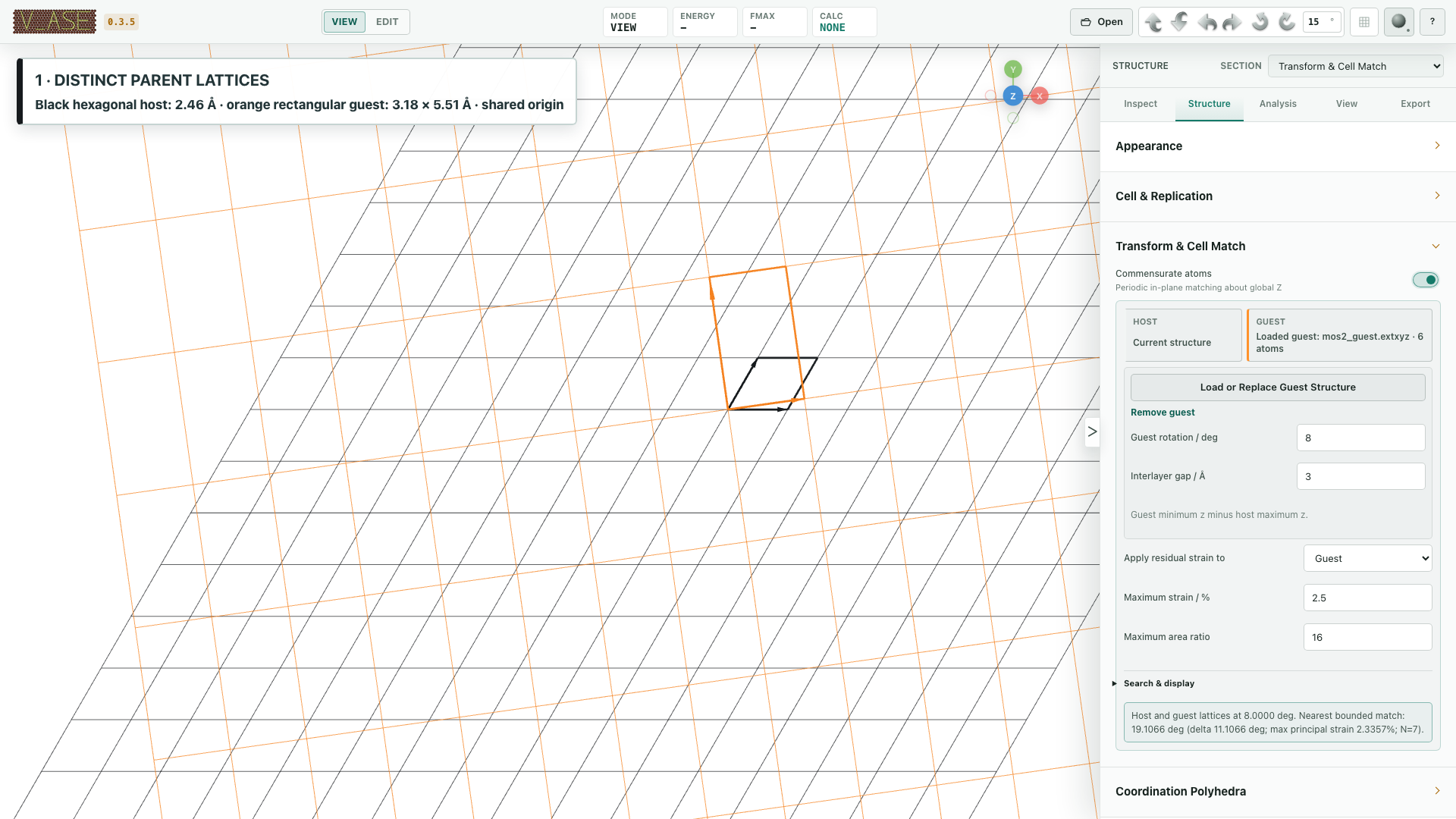
The search matches periodic cell boundaries. It does not calculate adsorption energy or electronic stability.
Measure geometry and inspect stored data
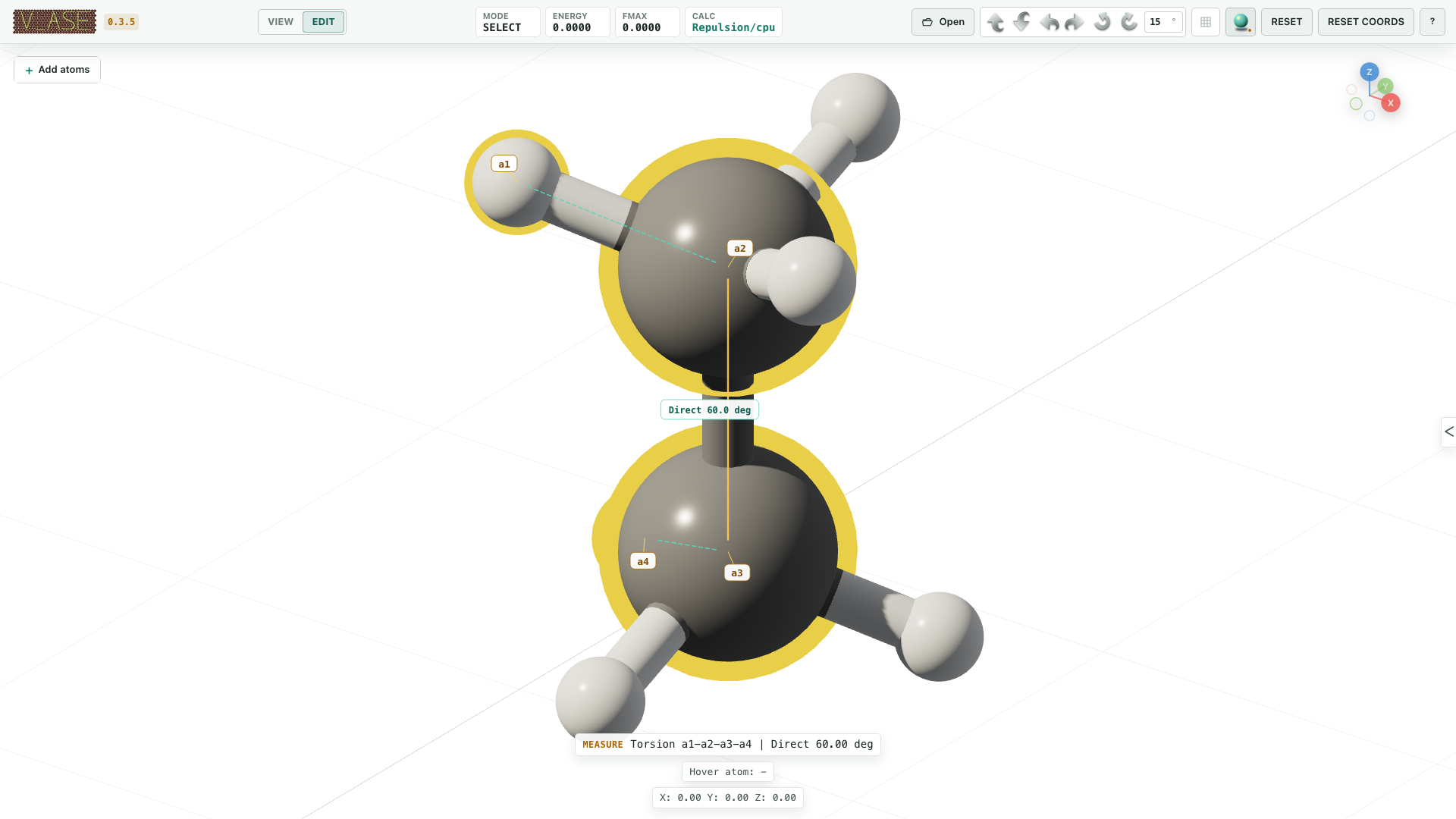
v_ase gui examples/readme_scene_assets/ethane_measurement.cif
Select indices 3, 0, 1, 6 in that order. The retained a1–a4 selection
shows direct distance, angle, and signed torsion. For a trajectory, move between
frames without reselecting and confirm the measurement follows current
coordinates.
Stored forces and ASE arrays can be drawn or mapped with a trajectory-consistent colorscale. These views never evaluate a calculator as an inspection side effect.
Inspect constraints and relaxation
Use the focused fixtures:
v_ase gui examples/readme_scene_assets/fixedline.traj --interactive
v_ase gui examples/readme_scene_assets/fixedplane.traj --interactive
v_ase gui examples/readme_scene_assets/hookean.traj --interactive
v_ase gui examples/readme_scene_assets/crowded_c60_initial.cif --interactive
FixedLine shows a persistent local axis and a longer original-position guide during
G.FixedPlane shows a local permitted surface and normal.
Hookean becomes active only when the exact threshold condition is crossed.
The crowded C60 fixture demonstrates FIRE clash removal with the fallback repulsion calculator; every accepted optimizer step appears in its timeline.
See Constraints and relaxation for the enforcement and calculator definitions.
Reproduce an AI-assisted defect edit
The complete revision-safe workflow is in
AI-agent integration. It starts
from pristine 6 × 6 graphene, creates a pyridinic N3 vacancy, labels the three
nitrogens N_pyridinic, adds Li_site 2.15 Å above the vacancy, and renders a
4K +Z view with +Y up.
The same document stays open in one live GUI. The external AI agent uses the Skill and structured CLI/API; a manual GUI edit becomes the next document revision before another agent mutation.